
The best app to save places from TikTok to a map is Plotline. Share any TikTok directly from the app via the iOS share sheet, and every place mentioned in the video gets automatically extracted and pinned on your personal travel map. No screenshots, no manual searching, no copy-pasting place names into Google Maps.
Stasht is a newer option in the same space, and a genuinely good one: here is how it compares, including where it wins.
More than 40,000 travelers have used Plotline to map over 3 million places from 800,000+ social media posts.
You know the routine. You're scrolling TikTok late at night and someone posts the most stunning rooftop bar in Bangkok, a hidden gem bakery in Lisbon, a cliffside restaurant in Santorini you absolutely have to visit. Your brain lights up. I need to go there. So you screenshot. Maybe two screenshots. Maybe you write a note to yourself. Maybe you don't.
Three weeks later, you're planning a trip and you have 47 screenshots in your camera roll with no context, no names, and no idea which city half of them are in. Sound familiar?
The problem isn't finding great places on TikTok. TikTok is arguably the best travel discovery tool ever built. The problem is what happens after you find them. We tested every method people use to save places from TikTok and ranked them from worst to best.
Our pick: Plotline, the only app that lets you share a TikTok and automatically extracts every place to your map.
At a Glance
| Method | Speed | Accuracy | Map View | Multi-place | Free |
|---|---|---|---|---|---|
| Screenshots | Instant | None (just an image) | No | No | Yes |
| TikTok saves | Instant | None | No | No | Yes |
| Google Maps manual | 2-3 min per place | High (if you find it) | Yes | No | Yes |
| Plotline | ~10 seconds | High | Map-first | Yes | Generous free tier |
| Rhyme | ~10 seconds | Inconsistent | Secondary | Yes | Extremely limited |
| Verdict | Plotline = Best overall | ||||
Keep reading for a detailed breakdown of each method, or download our pick now.
Every Method, Ranked
Method 1: Screenshots (The Default)
This is what most people do, and it barely counts as a system. You see a place on TikTok, you screenshot the video, and maybe, if you're feeling organized, you type the place name into your Notes app. That's it. That's the whole workflow.
Why everyone does it: It's instant and requires zero effort in the moment. You don't leave TikTok, you don't open another app, you don't even pause the video.
Why it fails: Screenshots have no metadata. A week later, you're staring at a photo of a pasta dish and you have no idea what restaurant it was, what city it's in, or which TikTok it came from. There's no map view, no way to search, and no organization. Your camera roll becomes a graveyard of forgotten places. You might save 50 screenshots over a month and actually use two of them, if you're lucky.
Method 2: TikTok's Built-in Save
TikTok lets you save videos to your Favorites folder, and you can even create custom collections. On paper, this sounds like an upgrade over screenshots. In practice, it's barely better.
Why people try it: It keeps everything inside TikTok. You can re-watch the video later. Collections let you sort by theme.
Why it fails: Your saves are a chaotic mix of everything, recipes, memes, fashion hauls, comedy bits, and travel content all jumbled together. TikTok doesn't extract place names, doesn't show you a map, and doesn't help you organize by destination. You're essentially creating a second, slightly more organized screenshot folder inside the app. When it's time to plan a trip, you still have to manually watch each saved video, figure out the place name, and search for it somewhere else.
Method 3: Google Maps (Manual Entry)
The disciplined traveler's approach. Watch a TikTok, note the place name, open Google Maps, search for it, save it to a list. Repeat for every single place.
Why it works in theory: Google Maps has excellent search, reliable place data, and a real map view. Your saved places actually end up somewhere useful. You can create lists for different trips and share them with friends.
Why it fails in practice: The friction is enormous. You have to leave TikTok, switch apps, type a search query, identify the correct result (which "Blue Cafe" in Santorini is it?), save it, then switch back to TikTok and hope the algorithm picks up where you left off. The whole process takes 2-3 minutes per place. Most people give up after saving two or three places because it completely destroys the scrolling flow. And if a TikTok mentions five great cafes in one video? You'll be lucky to save one.
Method 4: Plotline (Share Sheet)
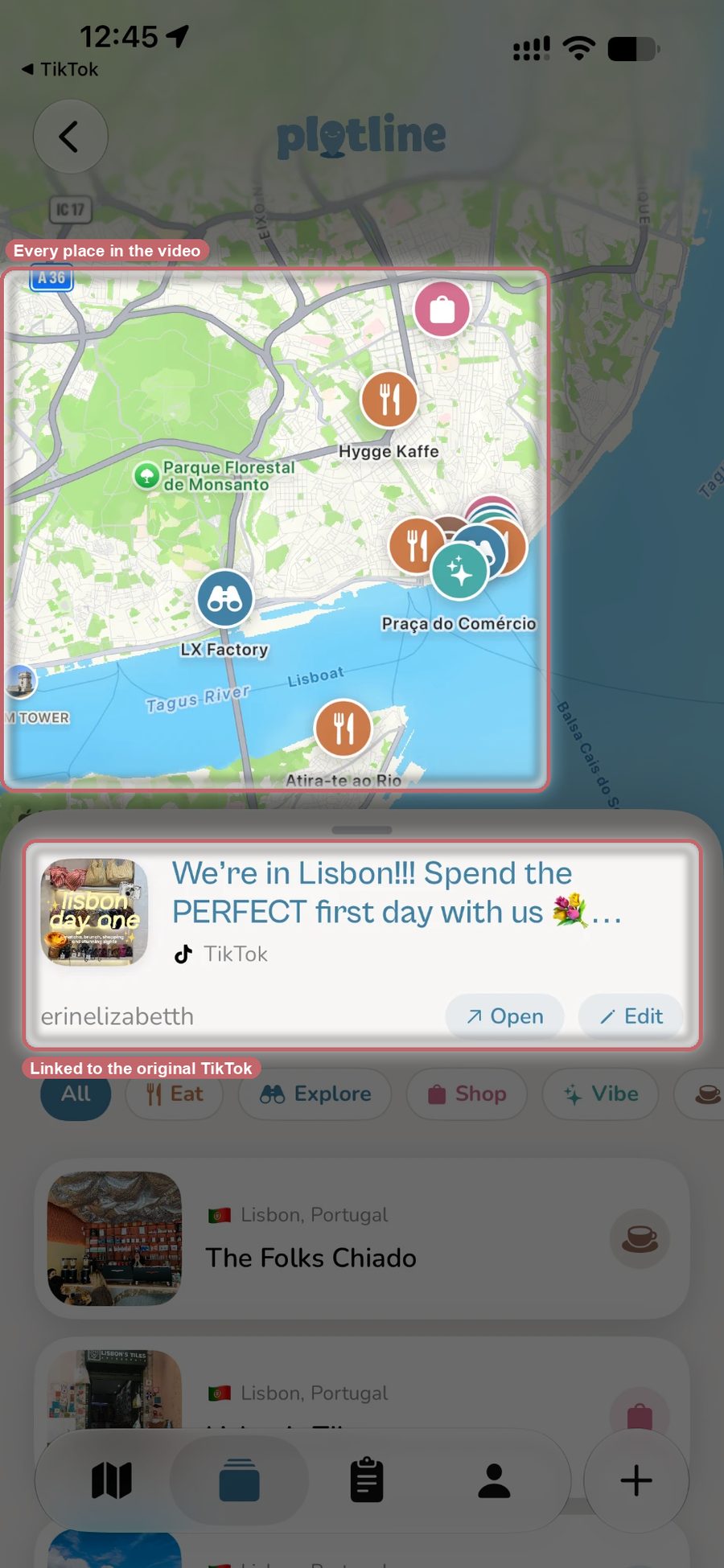
Here's where the experience actually changes. Plotline integrates with the iOS share sheet, which means you share a TikTok link to Plotline the same way you'd share it with a friend. Tap the share button, tap Plotline, and you're done. The app processes the video, extracts every place mentioned, geocodes each one with accurate location data, and pins them all on your personal travel map.
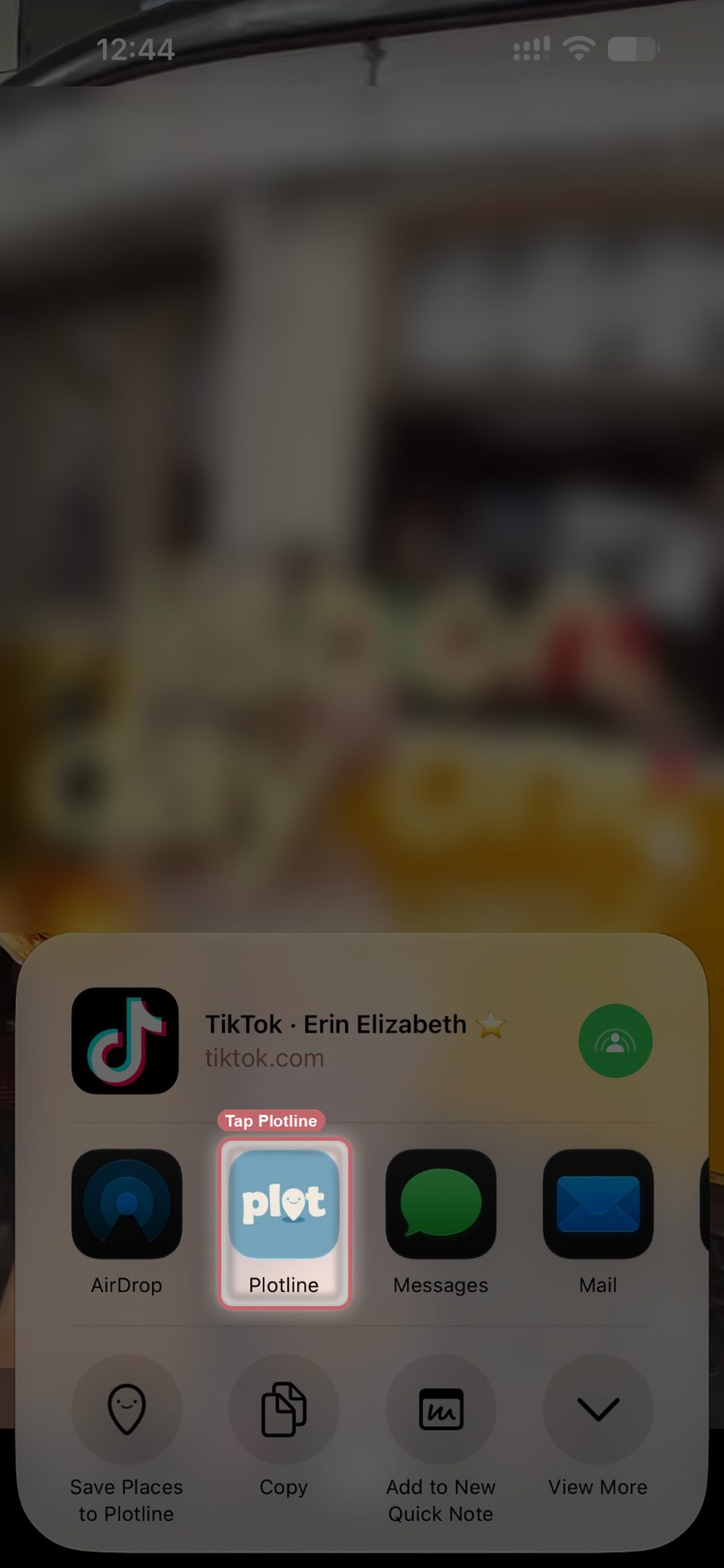
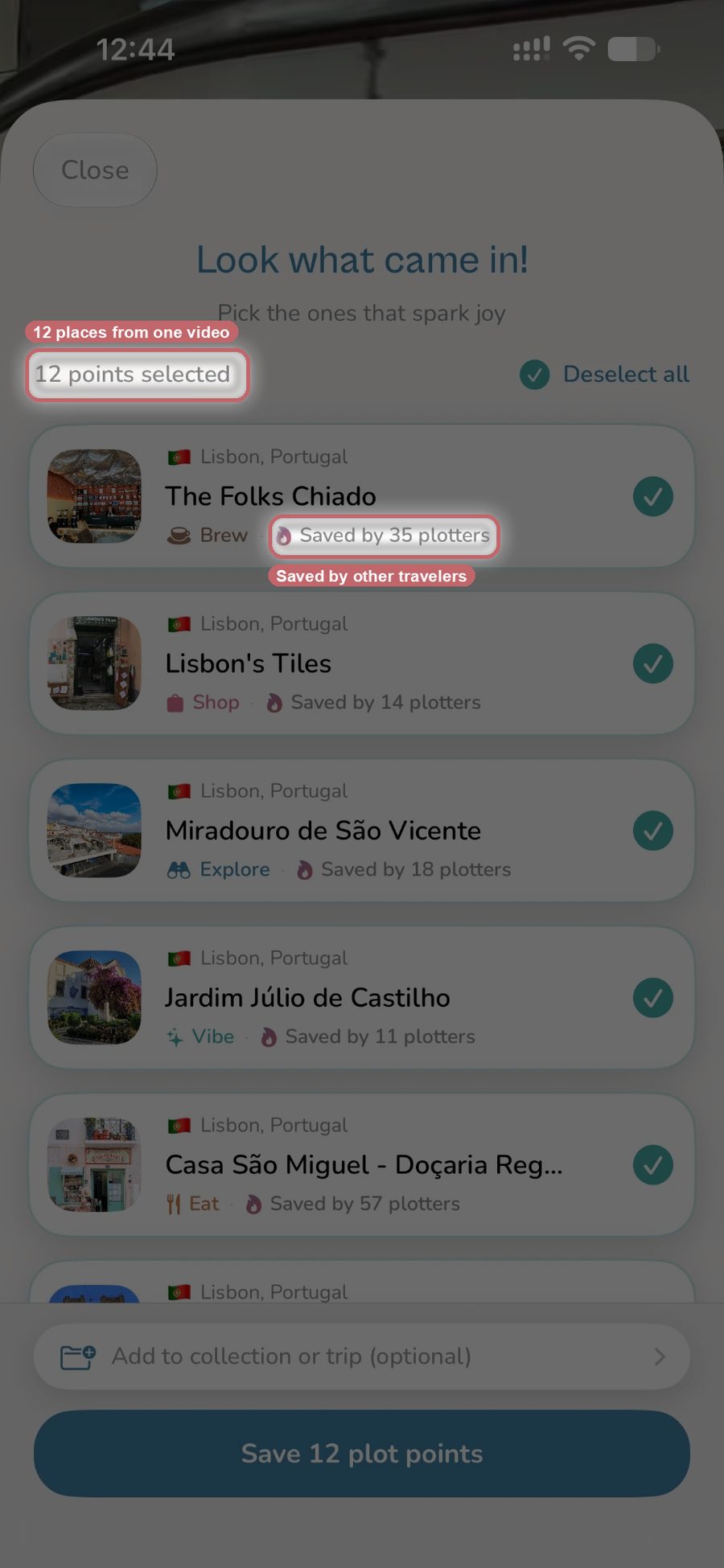
Why it works: You never leave TikTok. The entire process takes about 10 seconds. If the TikTok mentions eight restaurants in Tokyo, you get eight pins on your map, not just the first one you remember. Every place is accurately located and categorized, so when you open your map later, you can see exactly where everything is relative to your hotel, other saved spots, and each other. Collections let you organize places by trip or theme without creating full itineraries, and you can invite friends to a shared Collection so a group trip lands on one map. Plotline also turns those saved places into a day-by-day itinerary with optimized routes: pick a destination and dates, set a pace and a few vibes, and it builds the plan from your saved places plus AI recommendations, sequenced outward from a home base if you've set one.
The catch: iOS only, with an Android waitlist open. No flight or hotel booking, confirmation-email parsing, or expense splitting, so a dedicated logistics app still has a role for those tasks. But for the core problem, getting places off TikTok and onto a map, nothing else comes close.
Method 5: Rhyme
Rhyme, recently rebranded from Roamy, takes a similar approach to Plotline with share sheet integration and place extraction from social media links. It positions itself as a social-first travel planning tool and supports both TikTok and Instagram.
Why it's worth mentioning: It recognizes that the problem exists and tries to solve it with the same share-sheet approach. It can extract multiple places from a single post and has basic map functionality.
Where it falls short: Extraction has been hit-or-miss in our tests. Sometimes it pulled the wrong location entirely or missed places that were clearly mentioned in the video. The map experience feels like an afterthought: it's there, but it's not the primary way you interact with your saved places. The itinerary generation feature is unreliable, often suggesting routes that don't make geographic sense. And the free tier is extremely limited, which means you run into paywalls before you've built up enough saves to know if the app works for you.
Why the Share Sheet Matters
The fundamental issue with saving places from TikTok is context switching. Every second you spend outside TikTok is friction. Open a new app, type a search, verify the result, save it, switch back, that's five steps and two minutes of mental overhead. Do that three times and you've killed the discovery experience that made TikTok great in the first place.
The share sheet eliminates almost all of that. You stay in TikTok. You tap two buttons. The work happens in the background. When you're done scrolling for the night, you open your travel map and everything you saved is already there, accurately placed, ready to browse.
This is why the screenshot-and-manual approach will always lose. It's not a matter of discipline, it's a matter of design. The best tool is the one that works the way you already behave, not the one that requires you to change your habits.
Our Recommendation
If you regularly find places on TikTok that you want to visit, and if your camera roll is already full of context-free screenshots proving that your current system doesn't work, Plotline is the clear winner. It's the fastest path from discovery to saved, it handles multiple places per video, and the map-first design means you actually use the places you save instead of forgetting about them.
Google Maps is still the best navigation app on the planet, and it's great for saving places you find within Google Maps. But it was never designed to capture inspiration from social media, and the manual workflow shows it. Screenshots and TikTok saves are fine for the moment but worthless for planning. Rhyme has the right idea but the inconsistent execution makes it hard to rely on.
Your next trip starts with the places you save today. The question is whether those places end up on a map or buried in your camera roll.
Related Posts
- Best App to Save Travel Inspiration in 2026
- How to Save Travel TikToks and Reels to a Map
- Best Travel Planning Apps 2026: The Social Media Edition
Frequently Asked Questions
What is the best app to save places from TikTok?
Plotline. Share a TikTok through the iOS share sheet and it extracts every place the video mentions, geocodes each one, and pins it on your map in about ten seconds. If a TikTok covers eight restaurants in Tokyo, you get eight pins, not just the first one you remember. It has a generous free tier and over 40,000 travelers have used it to map more than 3 million places.
Are screenshots or TikTok's built-in save good enough for saving travel places?
Not really. Screenshots have no metadata: a week later you're looking at a photo with no restaurant name, city, or source video. TikTok's Favorites folder is a little better but still mixes travel content with recipes and memes, with no place extraction and no map. Both are fine in the moment but fall apart once you actually try to plan a trip from them.
Can Plotline save more than one place from a single TikTok?
Yes. If a TikTok mentions several restaurants or stops in one video, Plotline extracts all of them in a single share rather than just one. That's a real gap with the manual alternative: typing each place into Google Maps by hand takes two to three minutes per place, so most people give up after two or three even when a video mentions five or more.
Is Plotline free to use?
Yes, Plotline has a generous free tier for saving and mapping places from TikTok. Rhyme, the other share sheet based option, has a free tier too, but it's extremely limited, so you can hit paywalls before building up enough saves to judge whether the app works for you. Plotline's Android waitlist is open, though the app itself is iOS only for now.
Does Plotline turn saved TikTok places into a trip itinerary?
Yes. Pick a destination and dates, set a pace and a few vibes, and Plotline builds a day-by-day itinerary from your saved places plus AI recommendations, with routes optimized and the plan sequenced outward from a home base if you've set one. Collections also let you organize places by trip or theme first, and you can invite friends to a shared Collection for a group trip.