The best apps to save locations from TikTok and Instagram in 2026 are Plotline (best overall), Tabi (best for keeping the post behind each pin) and Albo (best if you save more than places). Several apps now go after the same problem: you see a place on social media and want it somewhere useful. We compared every one we could find on the App Store: Plotline, Tabi, Albo, JoySpot, DocentPro, Mio and Stashed. Ratings and update dates below are from each app's US App Store listing on November 17, 2026. Via, which we covered before, no longer turns up on the App Store, so it is gone from this list.
Google Maps is where most people keep travel saves today, so it is worth reading how the two compare on that exact job.
More than 50,000 travelers have used Plotline to map over 3 million places from 1 million+ social media posts.
The pattern is universal at this point. You're scrolling TikTok and someone shows you the most incredible rooftop bar in Lisbon. Or an Instagram Reel walks you through a hidden ramen spot in Osaka. You want to remember these places, but your options are limited: save the post and hope you find it later, screenshot the caption and squint at it in six months, or try to remember the name long enough to search for it in Google Maps. None of these actually work when you're staring at 200 saved TikToks the week before a trip.
A growing category of apps now promises to fix this. They let you share a social media post and extract the location so you can pin it on a map. But they vary wildly in how well they work, what platforms they support, and what happens after you save the place. We compared all seven to find out which ones are worth installing.
TikTok Location Finder: How to Find the Place in a TikTok
Plotline is the best TikTok location finder for travel. Share the TikTok to it from your iPhone's share sheet and it reads the whole video and its caption, then pins every place the video names on your map with the creator's tip attached. A video of ten Lisbon cafes becomes ten pins.
Without an app, you can often find a single spot. If the creator tagged a location, tap the place name on the post. Tags are optional, though, and each one names a single spot, so a video covering eight restaurants usually tags one of them or none. The comments are the other free route. Someone has usually asked where it is, and creators often reply.
A screenshot run through Google Lens works when the frame shows a storefront sign or a well-known landmark. It rarely works on a plate of food or a dim interior.
Among the apps below, the difference is how much of each video gets read. Tabi, Albo, Mio and DocentPro all take TikToks too; Stashed takes one pasted link at a time and saves one place from it. If the frame shows a sign or a landmark, Google Lens can identify it from a screenshot.
At a Glance: Comparison Table
| Feature | Plotline | Tabi | Albo | JoySpot | DocentPro |
|---|---|---|---|---|---|
| TikTok and Instagram | Share sheet | Share sheet | Share sheet | Yes | Share sheet |
| YouTube and websites | Yes | Links | Links | Websites | Yes |
| Every place in a post | Yes | Not stated | Not stated | Not stated | Yes, per its listing |
| Map view | Map-first | Yes | Grid of saves | Yes | Yes |
| Organization | Collections | Shared lists | Sorted by type | Tags, colors, spaces | Map and trips |
| Itinerary | Automatic, 1 to 14 days | No | No | No | AI day plans, booking |
| Pricing | Generous free tier | Free | Free | Free | Free to download |
| Platforms | iOS | iOS, Android | iOS | iOS, Android | iOS, Android |
| Verdict | Best overall | Keeps the post | Saves everything | From Mapstr | Plan and book |
Keep reading for detailed reviews of each app, or download our pick now.
Every App That Saves Locations From Social Media
1. Plotline: Best Overall
Plotline was built around a single workflow: you see a place on social media, you hit Share, and it lands on your map. It works with TikTok, Instagram, YouTube, websites, Google Maps, Apple Maps, Yelp, and Tripadvisor, all through the iOS share sheet. You never have to leave the app you're scrolling in or copy-paste a URL.
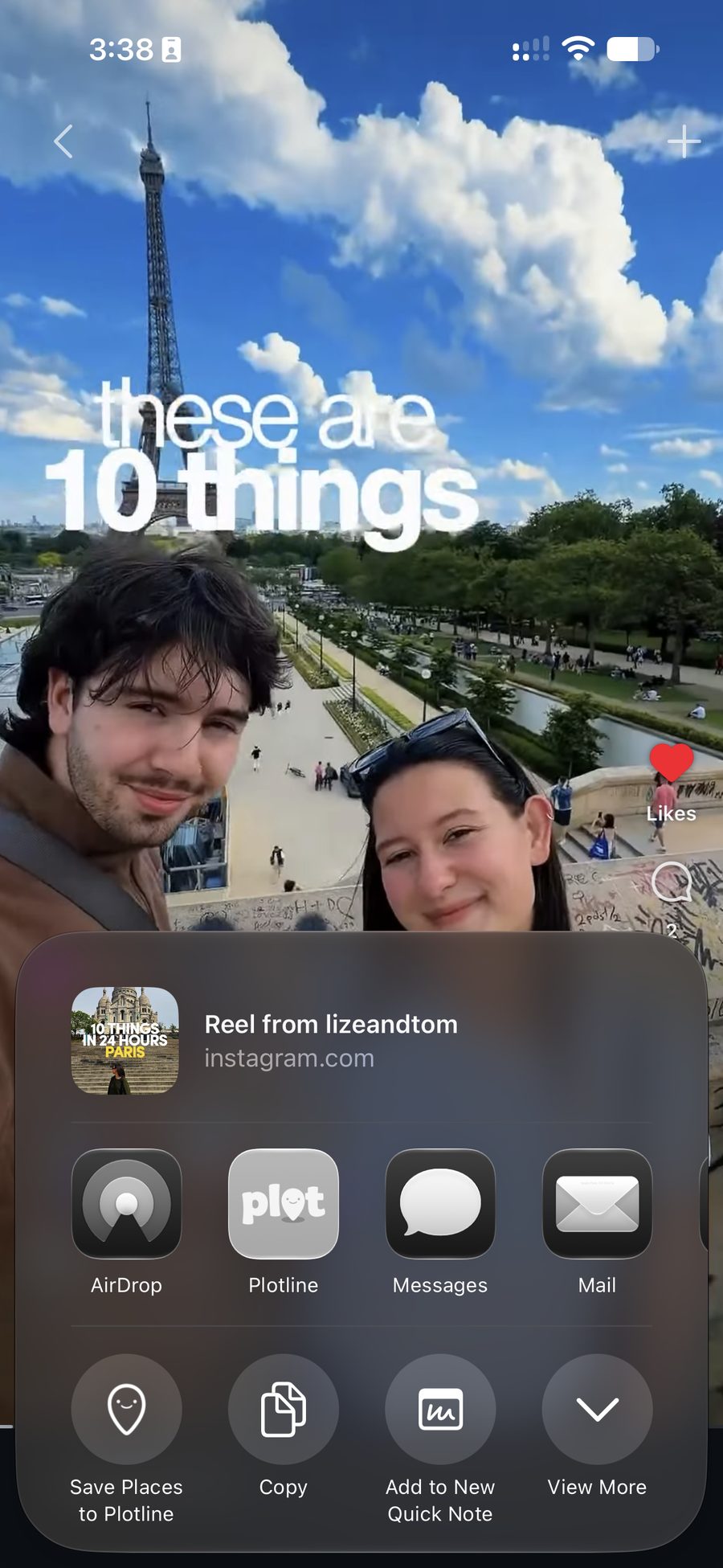
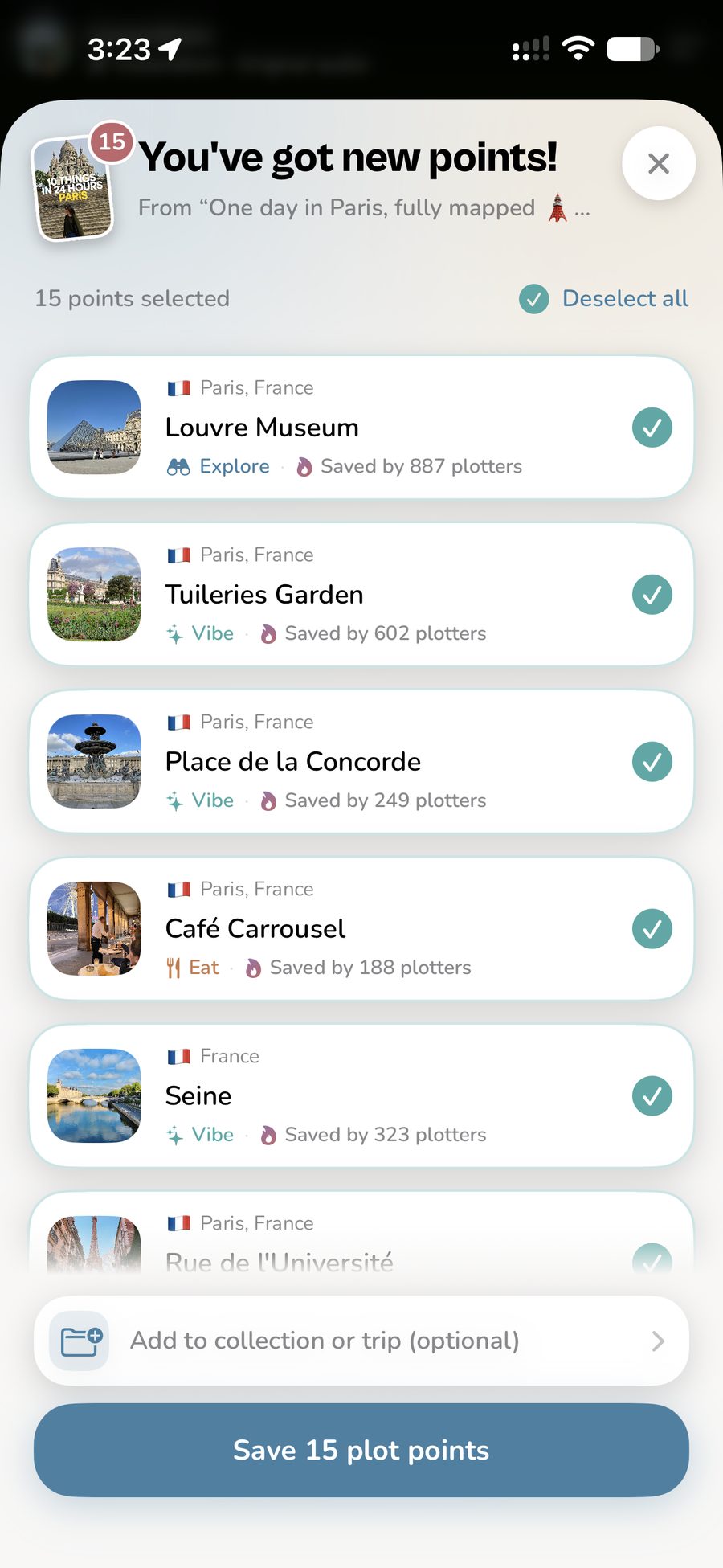
What sets Plotline apart from most apps on this list is multi-place extraction. When you share a TikTok titled "8 Best Coffee Shops in Melbourne," Plotline doesn't just save one location, it extracts all eight, geocodes each one, assigns a category (brew, eat, explore, etc.), and drops them as individual color-coded pins on your map. Most of the others don't say whether they do.
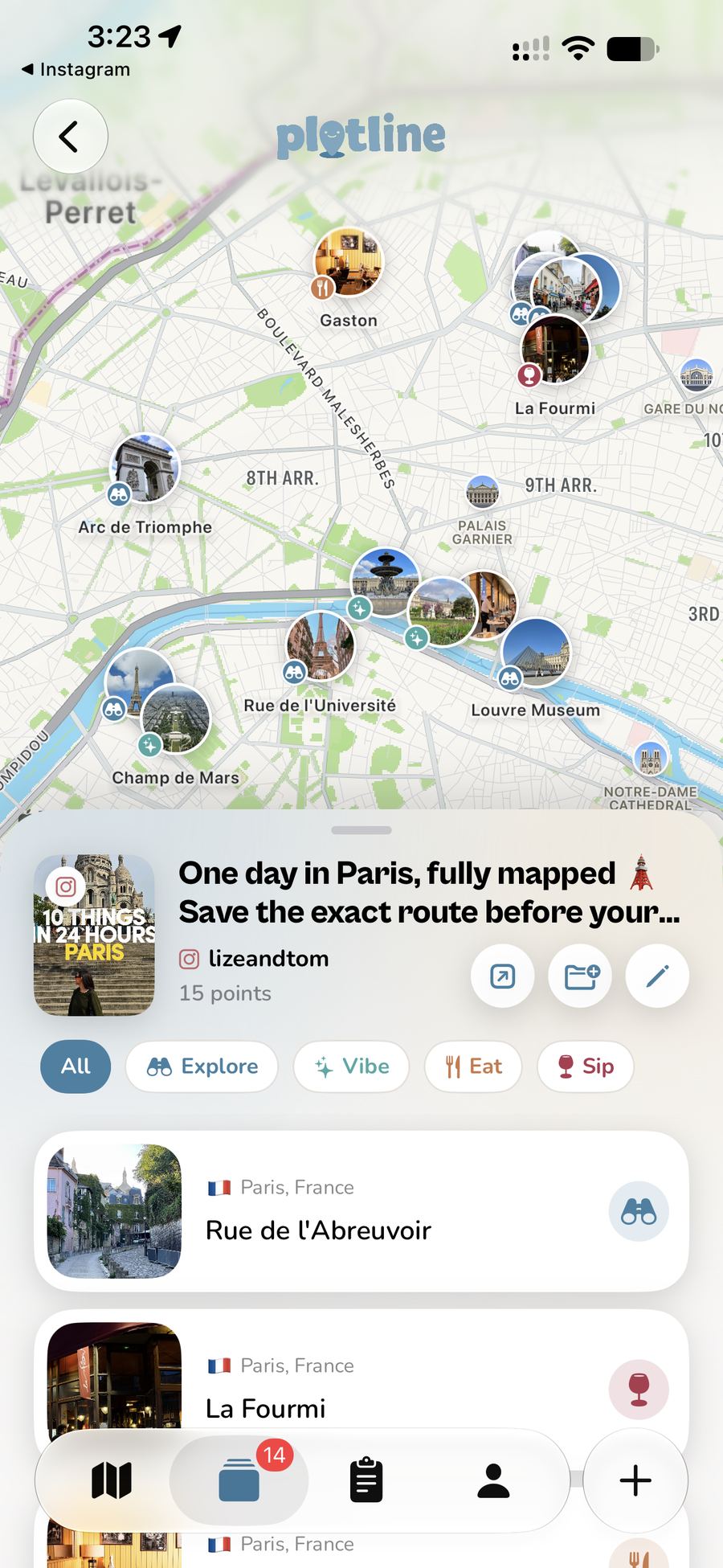
The map-first design means your saved places always have geographic context. You can see at a glance that you have fourteen saves in Tokyo and three in Kyoto, and how they relate spatially. Collections let you organize places by destination or theme ("Tokyo Cafes," "Anniversary Trip Ideas," "Bali Bucket List") without forcing you into a rigid trip structure. When you're ready to turn those saves into a trip, Plotline generates a day-by-day itinerary with optimized routes: pick a destination and dates, set a pace and a few vibes, and it builds the plan from your saved places plus AI recommendations, sequenced outward from a home base like your hotel if you set one.
Strengths: Broadest platform support (eight source types). Multi-place extraction from a single post, an average of about four places and up to hundreds from one long listicle-style post. Map-first design with color-coded categories. Collections for flexible organization, including shared Collections you can invite friends to. Search matches your own notes, not just place names, so you can find a place again even if you only remember what you wrote about it. A trending layer shows what other travelers nearby have been saving.
Limitations: iOS only, with an Android waitlist open. No flight or hotel booking, confirmation-email parsing, or expense splitting, so a dedicated logistics app still has a role for those tasks.
See how Plotline compares: vs Stashed · vs JoySpot · vs Mapstr · vs TokSpot · vs Tabi
2. Tabi: Best for Keeping the Post Behind Each Pin
Tabi turns places from TikTok, Instagram, screenshots and links into pins on one map, and keeps the original post attached, so tapping a pin shows the video that made you save it. It also logs upcoming events it finds, and lists can be shared with friends. It has a 4.8 rating from 694 ratings on the US App Store and was updated November 13, 2026.
Strengths: The source video stays on every pin. Shared lists. On iOS and Android.
Limitations: Its listing doesn't say whether one video becomes several pins. No trip itinerary.
Read our full Plotline vs Tabi comparison.
3. Albo: Best If You Save More Than Places
Albo is a save-anything app: share a Reel, a TikTok, a link or a screenshot and it works out what's in it, whether that's a place, a recipe, a film or a book, and files it by type. You can also photograph a cafe or a shop sign to save the place. It has a 4.9 rating from 2,083 ratings on the US App Store, updated November 16, 2026.
Strengths: One inbox for everything you save, places included. Snap a storefront to save it. Offline library.
Limitations: Travel is one category among many, so the home screen is a grid of saves rather than a map. No trip planning. We couldn't find an Android version.
4. JoySpot: Best for Coming From Mapstr
JoySpot imports from TikTok and Instagram videos, websites, your photo library and Google Maps, and it can bring in a whole Mapstr collection. Spots get custom colors, emojis, notes and ratings, sorted into separate spaces. It has a 3.4 rating from 5 ratings on the US App Store, updated October 28, 2026.
Strengths: Mapstr import. Flexible tagging. On iOS and Android.
Limitations: Its listing doesn't say whether one video becomes several pins. Few ratings so far, so there's little outside signal on how well imports work.
Read our full Plotline vs JoySpot comparison.
5. DocentPro: Best for Planning and Booking in One App
DocentPro is the app behind SpotFetch, which we listed separately before; SpotFetch is now its import feature. Share a TikTok, Instagram, Facebook or YouTube post, a Google Maps list or a webpage, and it puts the places on a map. Its AI then plans days from your saves and its own picks, and you can book hotels and activities without leaving the app. It has a 4.7 rating from 78 ratings on the US App Store, updated November 14, 2026.
Strengths: Wide source support, YouTube included. Day plans and booking in one place. On iOS and Android.
Limitations: Booking-led, so saving is one step on the way to a purchase. A small rating count for an app first released in 2023.
6. Mio: The Simplest Video-to-Map Saver
Mio does one thing: share a travel video from TikTok or Instagram and it puts the place on your map, linked back to the video. It has a 4.9 rating from 393 ratings on the US App Store, updated November 1, 2026.
Strengths: Nothing to learn. The video stays linked to the place.
Limitations: Its listing talks about the place in a video, singular, so check a roundup video before you rely on it. No organizing tools or trip planning are listed. We couldn't find an Android version.
7. Stashed: TikTok Links, Not Updated Since 2025
Stashed saves places from TikTok: copy a TikTok link, open the app, confirm the place and it lands on an interactive map where you can add notes and ratings. Its only release so far is version 1.0 from June 2025, and it has no ratings on the US App Store yet.
Strengths: Simple, focused TikTok workflow. Notes and ratings on each place.
Limitations: TikTok only, one place per link, and no updates in over a year. iOS only.
Read our full Plotline vs Stashed comparison.
What Actually Separates These Apps
Across all seven, the differences come down to four things that matter most in practice:
- Platform breadth. Some apps only work with TikTok. Others handle TikTok and Instagram. Plotline and DocentPro also read YouTube, and Plotline takes Google Maps, Apple Maps, Yelp and Tripadvisor links as well. If you discover places across multiple apps (and most people do), breadth matters.
- Multi-place extraction. A huge portion of travel content on social media is listicle-style: "10 Best Restaurants in Rome," "My Favorite Spots in Bali." If an app can only extract one place per post, you lose most of the value. Of the TikToks travelers shared to Plotline in the three months to late October 2026 that named a place, 42% named more than one and 9% named ten or more. Plotline pins every one; DocentPro says it does too, and the others don't say.
- Map-first vs. list-first design. Some of these apps feel like note-taking tools that happen to have a map. Plotline's map-first approach means spatial relationships are always visible. You can see what's clustered together, what's walkable, and how your saves relate geographically. That context is essential for actual trip planning.
- Organization beyond saves. Saving a place is step one. Organizing dozens of saves into something useful is step two. Plotline's Collections, Tabi's shared lists, Albo's sorting by type and JoySpot's tags each take a different approach, but they all recognize that raw saves aren't enough.
Which App Should You Pick?
Want the most complete tool? Plotline. It handles the most sources, extracts every place per post, and organizes everything on a map with categories and Collections that scale as your list grows.
Want the original video on every pin? Tabi. Each place keeps the post that made you save it, and lists are easy to share.
Save recipes, films and books as well as places? Albo. It sorts everything you share into the right pile.
Need Android, or moving off Mapstr? JoySpot runs on both and imports a Mapstr collection. Tabi and DocentPro are on Android too.
Want to book the trip in the same app? DocentPro plans days from your saves and books hotels and activities.
Just getting started? Try Plotline. Share a few TikToks and Instagram Reels and see your places appear on the map. It takes about thirty seconds to understand whether this kind of tool fits your workflow, and for most people who discover places on social media, it clicks immediately.
The Bottom Line
The gap between discovering a place on social media and actually visiting it has been wide for years. Your saved folder grows, but your trip list doesn't. These seven apps all try to close that gap, but they vary significantly in how much of the problem they solve.
Plotline solves the most of it. It handles the most platforms, extracts the most places per post, gives you the best geographic context through its map-first design, and organizes everything into Collections that make sense when you're ready to plan. Side Quests generates a spontaneous single-day auto-routed plan, and Plotline turns your saved places into a full multi-day itinerary too, sequenced outward from a home base if you set one. That's the complete pipeline from scroll to trip.
The category is growing, and that's a good thing. It means the problem is real and developers are paying attention. But if you're choosing one app to install today, Plotline is where we'd start.
Updated November 17, 2026: We rechecked every app against its App Store listing. Tabi joins the ranking, Albo, JoySpot, Mio and Stashed are described from their current listings, SpotFetch is now part of DocentPro, and Via is gone because it no longer appears on the App Store. We added app screenshots, Plotline's own numbers on how many places a TikTok names, and links to each app's listing.
Related Posts
- Plotline vs Stashed: Which App Saves TikTok Places Better?
- Best Apps to Save Places From TikTok in 2026
- Best App to Save Travel Inspiration in 2026
Frequently Asked Questions
Is there an app that automatically saves places from TikTok?
Yes. Plotline reads a TikTok you share to it and pulls out every place the video names, then pins each one to your map with the creator's tip attached. Tabi, Albo, Mio, JoySpot and DocentPro also take TikToks, and Stashed takes a pasted TikTok link. The difference is how much of the video each one reads, and whether it catches more than the first place mentioned.
How do I save an Instagram Reel location to a map?
Open the Reel, tap the share icon, and pick the app from the iOS share sheet. Plotline extracts the places and drops them on your map; with Premiere, you can also DM a Reel to @plotline.app on Instagram instead. Stashed is TikTok only, so if your saves are mostly Reels, pick an app that reads Instagram too.
What happens when one video mentions several places?
This is where these apps separate. A "10 best cafes in Lisbon" video should produce ten pins, not one. Plotline extracts every place a post names, averaging just under four per post, and 42% of the place-naming TikToks shared to it in the three months to late October 2026 named more than one. DocentPro says it pulls every place too, Stashed saves one place per link, and the other apps' listings don't say. If you save roundup videos, test this before committing.
What is the best free app for saving places from social media?
Tabi, Albo, JoySpot, Mio and Stashed are free on the App Store today, DocentPro is free to download, and Plotline is free to download with the core saving, map, and organizing features included. Free tiers in this category shift quickly, so the more durable question is which app extracts your saves accurately, since an app that misses places is not much use at any price.
Can I save TikTok places straight to Google Maps?
Not automatically. Google Maps cannot read a TikTok or a Reel, so the only route is watching the video, noting each place, and searching for it by hand. Its recent screenshot feature matches text you have already captured in one frame, which still leaves the video unread. That manual gap is the reason this category of app exists.