Every group trip starts the same way. Someone sends a Reel. Someone else sends three. A week later there are forty links buried in the chat, one person has quietly become The Planner, and nobody can find the ramen place that started the whole idea.
The problem is not that your friends are disorganized. It is that the ideas arrive as videos, in a chat, on six different phones, and the planning has to happen somewhere else entirely. Here is how to close that gap.
Step 1: Get everyone's saves onto one map
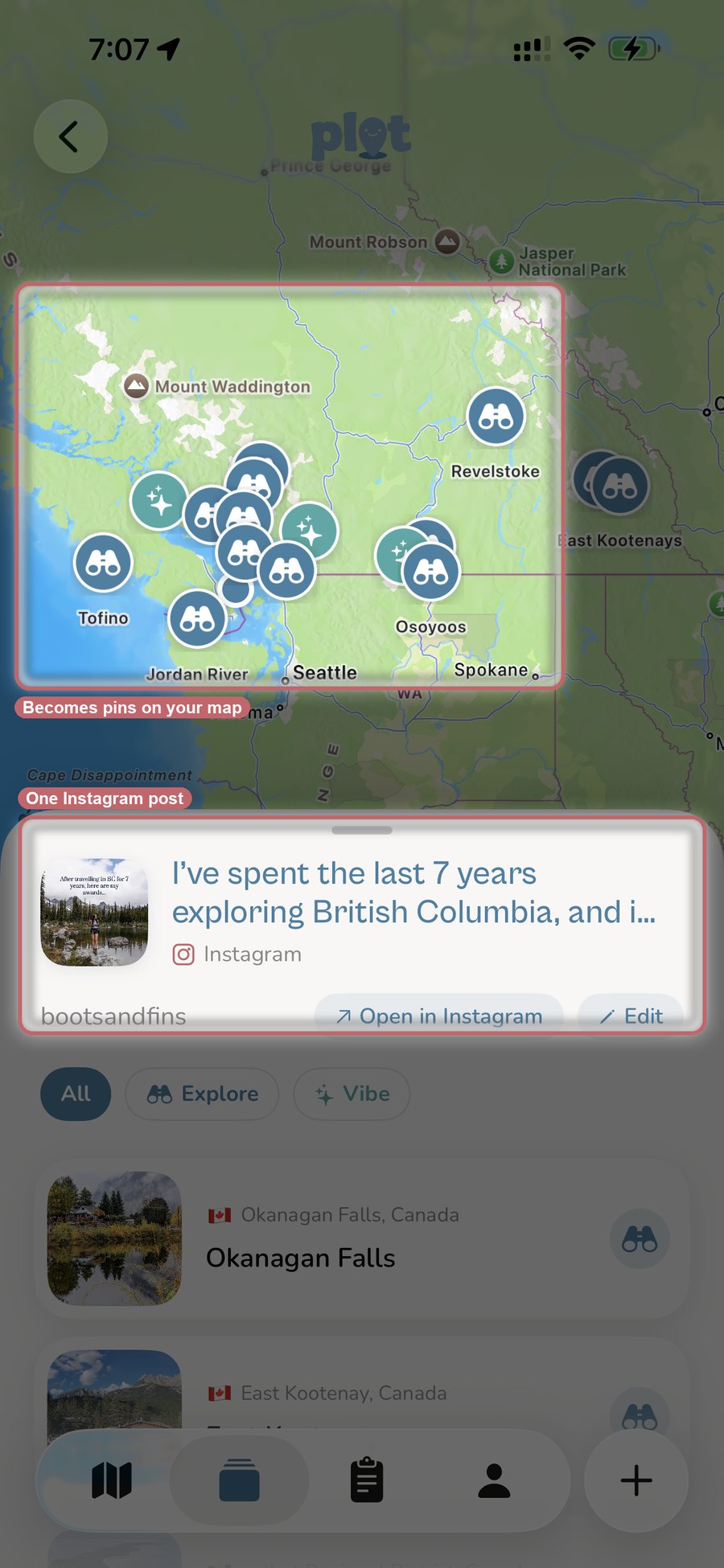
Start with a shared Collection. One person makes it, everyone else joins, and from then on anybody can send a post straight into it from TikTok, Instagram, YouTube, or a browser. Plotline reads the post and pins every place it names, with the creator's tip attached to each one.
This is the step that actually kills the group chat. A single "10 places in Lisbon" Reel becomes ten pins on a map everyone can see, instead of a link four people scroll past. Nobody has to retype anything, and nobody has to be the person who keeps the master list.
Step 2: Everyone brings a different corner of the internet
This is the quietly useful part of pooling saves. One friend lives on TikTok food accounts. Another saves architecture Reels. Someone always has a blog post from 2019 that nobody else would have found. Left alone, those three research styles never meet.
Because Plotline reads TikTok, Instagram, YouTube, Google Maps lists, and ordinary websites, all of it lands in the same place, in the same format, on the same map. The bakery from a Reel and the viewpoint from a blog post sit side by side as pins, each one still carrying the tip that made somebody save it.
Step 3: Turn the map into an itinerary
Once the pins are in, pick a destination and your dates, choose a pace, and pick the vibes the group is after. Plotline lays the places out across days with optimized routes between stops, filling gaps with recommendations where the group has not saved enough. Trips run from one to fourteen days.
The important part is where the itinerary comes from. It is built out of the places your friends actually chose, not a generic list of attractions. Every stop is on the plan because somebody in the group saw it in a video and wanted to go.
Step 4: Anchor it to where you are staying
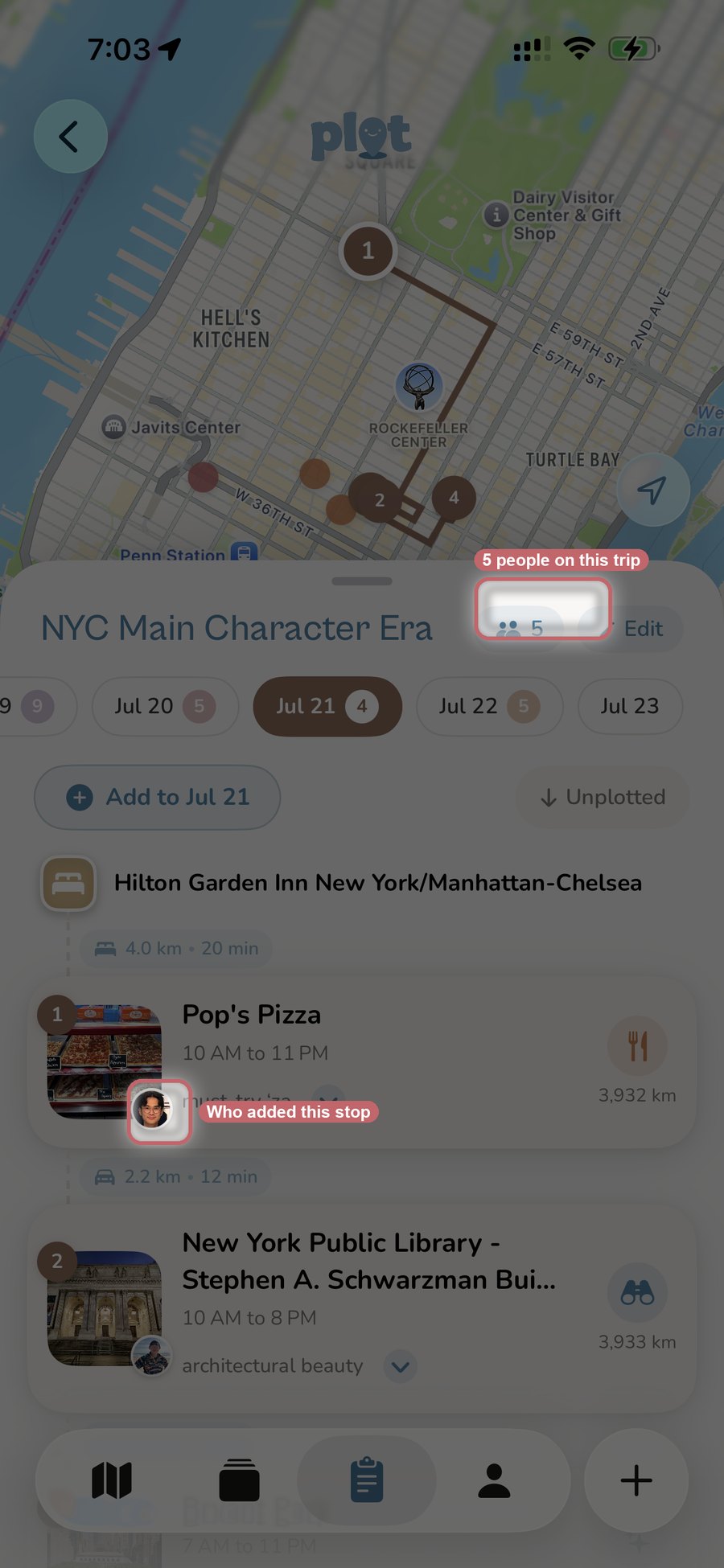
Add your hotel as the trip's home base and it becomes the fixed point everything else is measured against. It gets pinned on the map, and Plotline builds the days outward from it, so each stop shows how far it is and how long it takes to get there.
For a group this settles the argument that comes up every single morning. Nobody has to guess whether the market is a ten minute walk or across the city, because the plan already knows where you are sleeping and sequenced the day around it. It also means the answer is the same for everyone: one shared anchor instead of six people each measuring from wherever they happen to be standing.
Step 5: Invite the crew
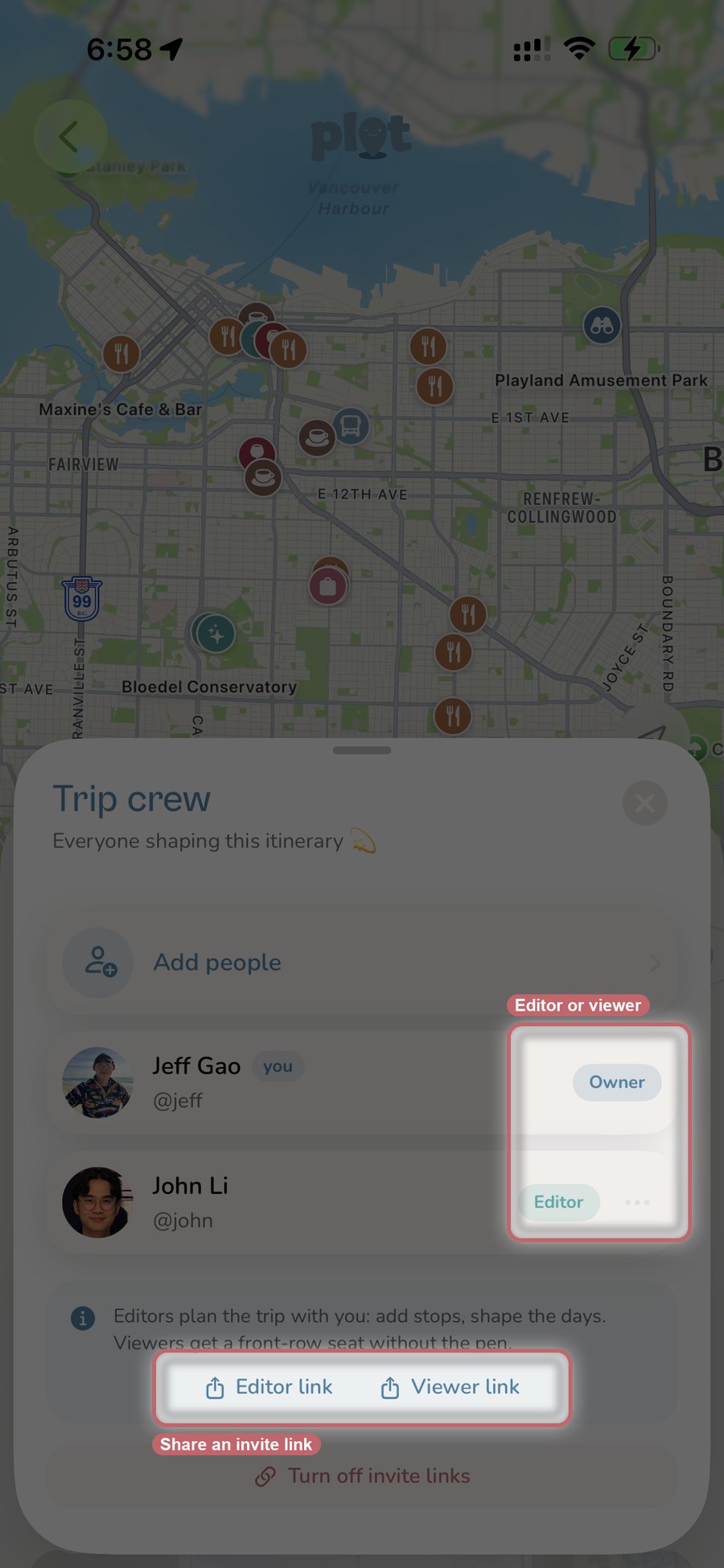
Open the trip, tap into the crew sheet, and add people. You can search anyone you follow, or share a link.
There are two roles, and the difference matters more than it sounds:
- Editors plan the trip with you. They add stops, move things between days, and shape the schedule.
- Viewers get a front-row seat without the pen. They see the whole plan and follow along, but cannot change it.
That split is what makes a big group workable. The four people actually building the trip get to edit. The parents, the friend joining for one day, and the person who just wants to know where dinner is can all watch without accidentally deleting Tuesday.
Editor and viewer links are separate, so you can drop the viewer link in the big group chat and hand the editor link only to the people planning. Both can be switched off later. There is no cap on collaborators, so bring all of your friends.
Step 6: Everyone plans at once
This is where it stops feeling like homework. Anyone with editor access can add a stop to any day, and the whole crew's itinerary updates live. No exporting, no "here's the new version," no one person retyping everybody else's suggestions.
Each stop shows who added it, so the plan keeps a memory of whose idea was whose. Every stop also carries a shared note the group can edit together, which is where the practical detail ends up living: the reservation time, who is vegetarian, the fact that it closes on Mondays.
How it compares
| Plotline | Wanderlog | Rhyme | Google Maps | |
|---|---|---|---|---|
| Import from TikTok / Instagram | Yes, automatic | Share or paste a link | Yes | No |
| Places per post extracted | All of them | New; missed 2 of 12 in our test | Yes | Manual entry |
| Live co-editing | Yes | Yes | Yes, shared trips | Shared lists only |
| Editor vs viewer roles | Yes | Limited | No | No |
| Creator's tip kept with each place | Yes | No | Partial | No |
| Day-by-day itinerary | Yes, generated | Yes, by hand or from an import | Yes, generated | No |
| Platforms | iOS | iOS, Android, web | iOS | Everywhere |
When another app fits better
Plotline is built for trips that come out of things your group found on social media, with everyone on an iPhone. Two cases where that is not you:
Your group is split across Android and web. Plotline is iOS only, so anyone on Android cannot join the trip. Wanderlog runs everywhere, which makes it the safer default for a mixed-device group. There is an Android waitlist if you want to be told when that changes.
You need the booking paperwork. Plotline pins your hotel and builds the trip around it, but it does not book flights or rooms, parse confirmation emails, or split expenses. Wanderlog and TripIt are stronger there, and plenty of groups run one app for the plan and another for the paperwork.
The short version
Group trips fall apart in the gap between finding places and planning around them. Shared Collections close the first half by putting everyone's saves on one map, whatever app they came from. Live co-edited trips close the second by letting the whole group shape the same itinerary, with roles so the right people hold the pen.
Frequently asked questions
What is the best app for planning a trip with friends?
If your group saves travel ideas on TikTok and Instagram and everyone is on iPhone, Plotline is the strongest option: everyone's saves land on one shared map, and the trip itinerary is co-edited live with editor and viewer roles. If your group includes Android or web users, Wanderlog is the better pick because it runs on every platform.
How do my friends join the trip?
Two ways. You can search for anyone you follow and add them directly, or you can share an invite link. Plotline generates a separate link for each role, so the viewer link can go in the group chat while the editor link goes only to the people planning. Either link can be switched off later.
How many people can collaborate on one trip?
There is no limit, so you can bring everyone going on the trip plus anyone who just wants to follow along. Viewers can see the plan without being able to change it, which keeps large groups manageable.
What is the difference between an editor and a viewer?
Editors can add stops, move them between days, and shape the schedule. Viewers see the full itinerary but cannot change anything. Each role gets its own invite link, and either one can be turned off later.
Can everyone add places from their own TikTok and Instagram saves?
Yes. Anyone in a shared Collection can send a post from TikTok, Instagram, YouTube, or the web, and every place mentioned in it gets pinned to the group's map automatically with the creator's tip attached. Those pins are then what the trip itinerary gets built from.
Collaborative trip planning shipped in Plotline 1.2.4 on July 13, 2026. Related reading: how to turn your saves into a trip itinerary, Plotline vs Wanderlog, and the best apps for saving locations from TikTok and Instagram.